

Do you want to know whether ConvertKit is the correct email marketing service for your business? You have come to the right place.
Table of Contents
ToggleThe number of global email users reached 4.6 billion in 2025 and is projected to grow to 4.9 billion by 2028 (Source).
In the overcrowded email marketing world, the right platform is the difference between a successful email list that can generate income and a nightmare that will cost you time and money.
ConvertKit is the new powerhouse among creators, bloggers and online entrepreneurs- but is it all it is hyped?
This is the plain truth- ConvertKit (now renamed as Kit) is not aimed at e-commerce stores and conventional businesses.
And Convertkit can be just what you are looking for, should you be a blogger, podcaster, YouTuber, creator of a course or an online entrepreneur.
However, it may not be the best option when what you are operating is a product-based business or requires more complicated automation.
22% of marketers reported email marketing as one of their top ROI-driving channels. This puts it in the 5th-highest spot. Website/blog/SEO was #1 with 27% (Source).
I’ve used ConvertKit for 6 months in the past, and I spent it on many email marketing campaigns, testing all its features, which were evaluated against other competitors, such as Mailchimp and MailerLite, and whether it was worth that monthly investment.
I had been able to handle email lists ranging between 500 and 50,000 subscribers on ConvertKit, so I am sharing my full and unbiased breakdown of everything you need to know.
Looking to explore options on ConvertKit free plan, Compare ConvertKit vs Mailchimp, or simply asking yourself what ConvertKit costs- whatever you need to know about this email marketing platform, this detailed guide would address it all. Let’s dive in!
You May also Like:- Best Gpl Sites For Plugins and Themes
Summary
ConvertKit (since renamed Kit) is an email marketing tool that serves creators, bloggers, and online entrepreneurs in particular.
It revolves around straightforwardness and effective automation to help you expand your fanbase, sell online content, and earn money from the content you produce through email marketing.
Key Highlights-
Perfectly suited to- The content creators, bloggers, course creators, Podcasters, YouTubers.
Complimentary until 10,000 subscribers (no limitations)
Key Strengths- Ease of use, strong automation, features for the creators.
Primary Weaknesses- Flexible design is not as flexible, does not have inbuilt CRM and is priced higher than some of the competitors.
Alternative to Best Choice- MailerLite (more convenient free plan), Mailchimp (more opportunities).
Who is ConvertKit to be used by-
- Bloggers who develop email lists.
- Course creators of goods that are sold online.
- Podcasters growing audiences
- YouTubers monetizing content
- Web-based coaches and advisors.
- Newsletter creators
To whom Kit Should Not Be Recommended-
- No Online stores (Klaviyo is preferred)
- NO Big businesses (better with HubSpot)
- No Users who require sophisticated design (Mailchimp is superior)
- NO Tight budgets (MailerLite free plan is better)
Summary- Kit is a perfect email marketing tool with easy automation that is creator-centred.
In case you are a content creator who does not want to struggle with the complex tools to monetize the audience, ConvertKit is a good option.
Nevertheless, when planning for high design requirements or a low budget, consider other options.
You May also Like:- Best 5 Sites to Buy Google Reviews
What is Kit?
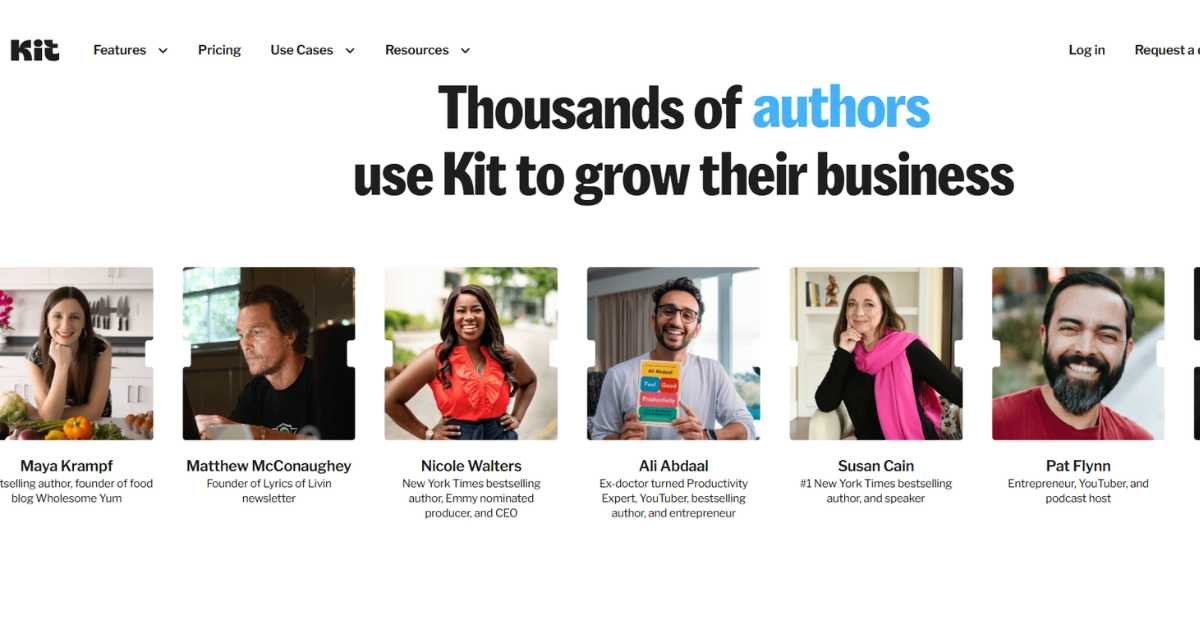
Kit is an email marketing tool that has been designed with specific creators in mind, who will use it to maximise their audience and earn a profit.
In contrast to the classic email marketing tools, which attempt to meet the needs of all people, the ConvertKit is narrowed down to the interests of bloggers, podcasters, YouTubers and creators of online courses.
The Kit Story
- Founder- Nathan Barry, who founded this company in 2013.
- Original Name- ConvertKit
- Rebrand- 2024 to Kit (however, most people refer to it as ConvertKit)
- The headquarters is located in Boise, Idaho, USA.
- Mission- Assist creators to make their living on the internet.
ConvertKit vs. Other Providers
Creator-First Philosophy-
ConvertKit is not as ambitious as to be all things to all. It is modelled on the way the creators work in reality-
Subscriber-Centric (Not List-Centric)- You should be subscriber-centric, not list-centric. Issues of duplication can be reduced since one subscriber can be subscribed to many segments.
Simple Automation- It is an intuitive, yet mighty, visual automation builder.
Content Delivery- Automated delivery of lead magnets on automatic landing pages, forms and tools.
Monetize your content
Key Features Overview
Automation Tool of email marketing-
- Visual automation builder
- Tag-based segmentation
- Behavioral triggers
- Automated sequences
- Personalization options
Landing Page Builder-
- Pre-made templates
- Customizable designs
- Lead magnet delivery
- Mobile-responsive
- A/B testing
Email Automation Software-
- Broadcast emails (newsletters)
- Automated email sequences
- Drip campaigns
- Welcome sequences
- Sales funnels
Commerce Features-
- Sell digital products
- Process payments
- Deliver downloads automatically
- Subscription management
- Affiliate program tools
Forms and Opt-ins-
- Inline forms
- Pop-ups
- Slide-ins
- Landing pages
- Embed anywhere
You May also Like:- Ahrefs Vs Semrush- Which one is Best Group SEO Tool?
What ConvertKit Does Best?
Over 70% of people across age groups use an email service every month (Source).
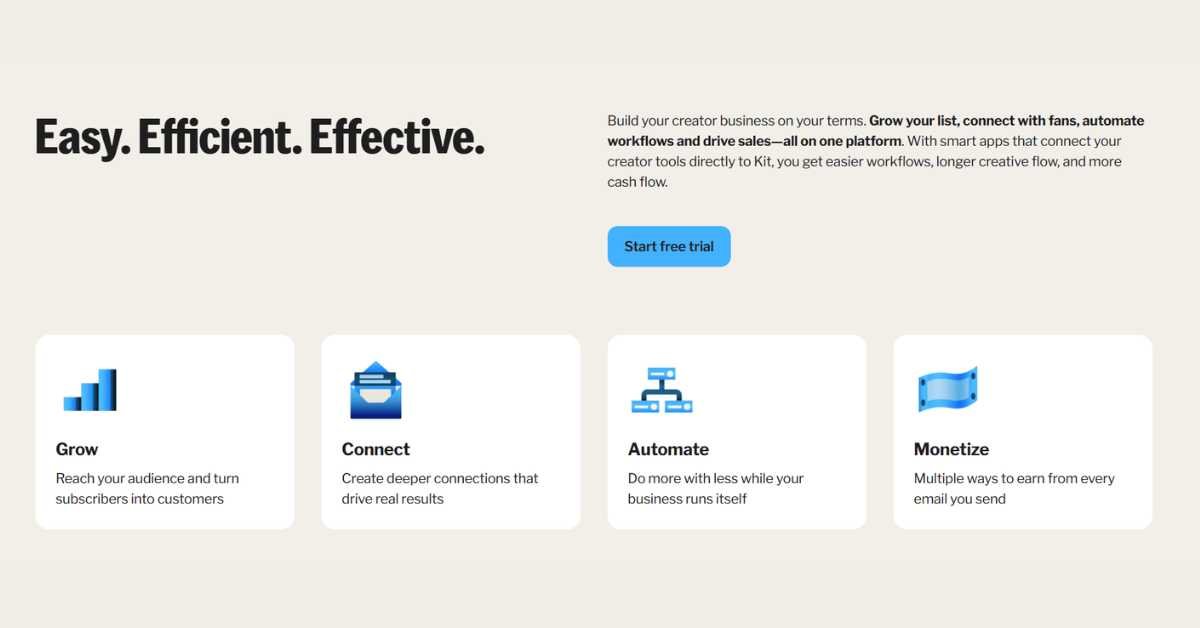
First is that of simplicity without compromising power.
The interface at ConvertKit is easy to use. There will be no 50 buttons and complex menus. Everything is straightforward-
- Send broadcast → Click on send; however, I selected subscribers and then Done.
- Develop automation, Organisational visual builder, Drag and drop Publish.
- Create landing page ( Then ) Template Selecting Template Customizing Publication.
- Tag-Based Subscriber Management
ConvertKit operates based on tags- instead of having several lists (which will introduce doubles and misunderstandings), it operates on the principle of tags-
- A single subscriber in the account.
- Their interests displayed on several tags.
- Auto easy segmentation of targeted emails.
- None of the records of duplicates of subscribers.
Example-
You, Sarah, subscribe to my blog. She-
- Lots of free eBooks (Tag: “eBook Subscriber”)
- Flickr: “About photography” (Tag: “Photography Interest).
- Make a purchase of your course (Tag: “Customer”)
Now you are able to email her with targeted emails using these tags instead of having to have three separate lists.
- Creator Monetization
The ConvertKit Commerce allows you to-
- Sell electronic books, courses, and templates.
- Facilitate one-time or recurrent payments.
- Provide online products on demand.
- Run affiliate programs
- Monitor the revenue within ConvertKit.
Converting Kit Weaknesses
Limitations to Know-
- Simple email template designs (with no hidden agenda)
- No inbuilt CRM to handle customer relations.
- Failure to provide basic reporting in comparison with enterprise tools.
- Orschief is not suitable for e-commerce stores.
- The free plan does not have A/B testing.
- Poor interface with certain platforms.
You May also Like:- Srmehranclub Review- GPL Plugins &Themes
How to Log in to ConvertKit (Step-by-Step)
First-Time Setup
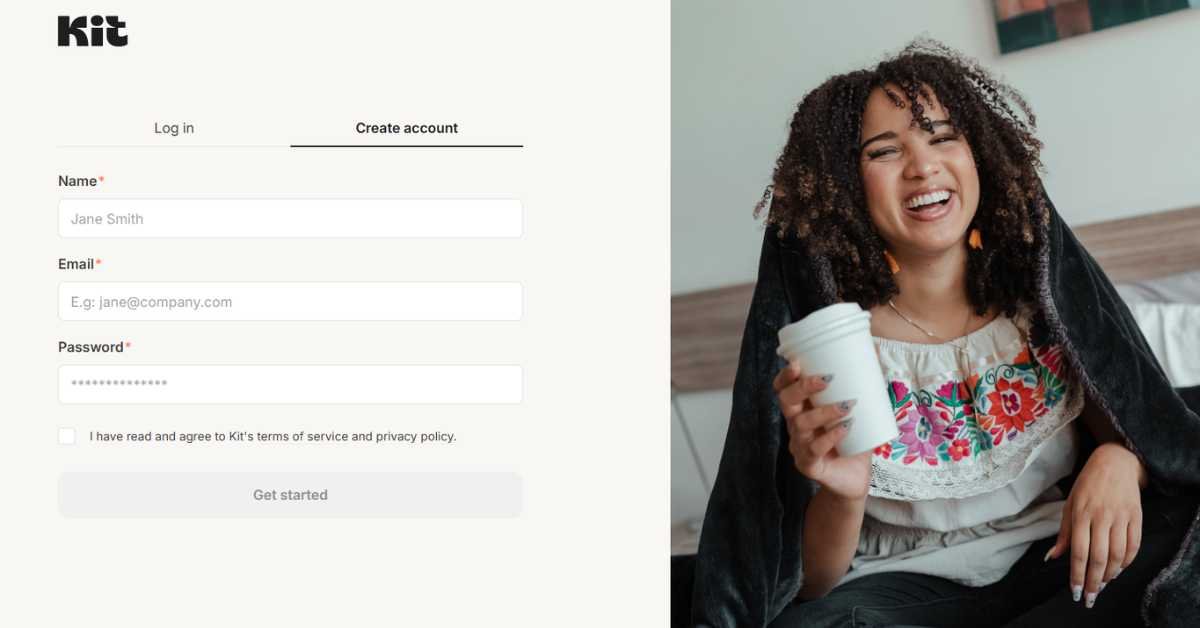
Step 1: Creation of an account
- Visit- KIT
- Click on free starting button.
- Enter Email address
- Choose a password
- Click on the Create my Account button.
Step 2: Email Verification
- Check the inbox of your email.
- Welcome email Find ConvertKit welcome email
- Click verification link
- Account activated
Step 3: Initial Setup
ConvertKit will require the following questions to be answered-
- Which purposes will you use ConvertKit? Blogging, course, podcast, and so on.
- What is the number of subscribers that you have?
- Please provide the URL of your site?
This assists in personalization of experience.
ConvertKit Login Process
Regular Login-
- Go to-https://app.convertkit.com
- Enter Email address
- Enter your password
- Click “Log In”
Alternative Login Methods-
- Google Sign-In: Click on continue with Google.
- Apple Sign-In: Clockwork Continue with Apple.
Forgot Password?
Reset Your Password-
- Login on forget password page.
- Enter Email address
- Looking into the email to get reset link.
- Click link in email
- Create new password
- New password Log in.
There are problems with ConvertKit log-ins (Common Problems).
Problem- “Failure to find email message”
Solution- Be sure that you are subscribing to various emails.
- Test the email address on which you subscribe to the newsletters.
- Make new account in case of necessity.
Problem- “Wrong password”
Solution- Click on the Forgot Password to reset.
Inquire whether Caps Lock is disabled or not.
Firstly, it is better to verify that password is typed in notepad.
Problem- “Account suspended”
Problem- Contact ConvertKit.
Check mails as notification of suspension.
Most of the time associated with spam or payment problems.
Reason- Failure to log in to the account.
- Troubleshooting- Clear the browser history and cookies.
- Try different browser
- Block the usage of browser extensions.
- Help desk in case of persistence of the problem.
Mobile Access
ConvertKit Mobile App-
Nowadays, ConvertKit does not have a mobile application. However-
- Browsing is good using the mobile phone web browser.
- Mobile phone responsive interface.
- has the ability to send mobile broadcasts.
- Full functionality available
You May also Like:- WorldPressIT Review- GPL Plugins and Themes for WordPress
What is Kit (ConvertKit )Pricing?
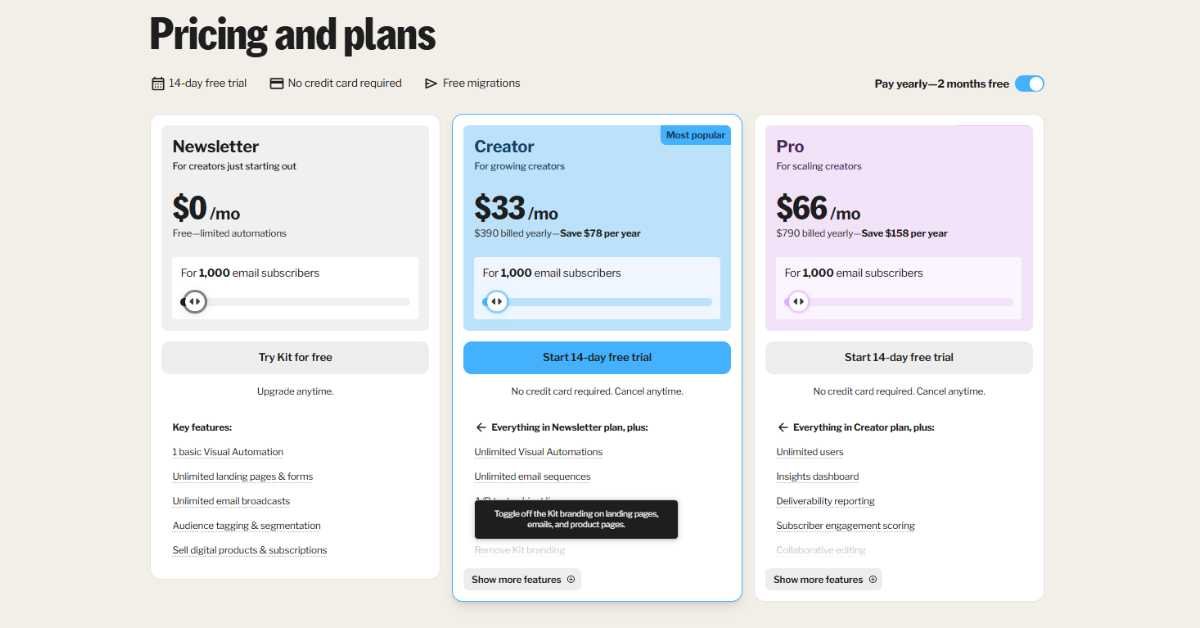
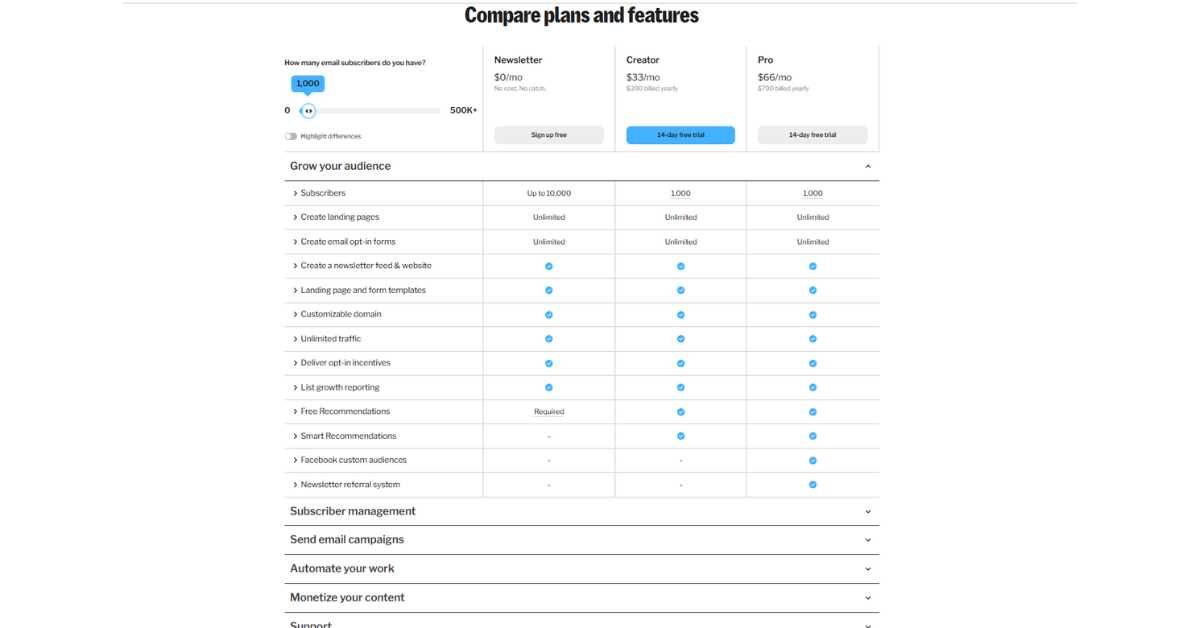
The prices of ConvertKit are determined by the number of subscribers you have and are divided into three levels. The following is the whole pricing plan of 2026-
ConvertKit Free Plan
- Price: $0/month
- Maximum number of subscribers: 1000 subscribers.
- Email Sends: Unlimited
What’s Included-
- Email broadcasts (newsletters)
- Landing pages (unlimited)
- Forms (unlimited)
- Sell digital products
- Community support
- Tagging and segmentation of the audience.
- Paid subscriptions
- Sale of online goods and subscription.
What’s NOT Included-
- Email automation/sequences
- Visual automation builder
- No other tools integrations.
- Newsletter referral system
- Advanced reporting
- Priority support
Best For-
- Complete beginners
- Conducting a pre-commitment test of ConvertKit.
- Simple newsletter sending
- Extremely rudimentary email marketing requirement.
Limitations-
The free subscription is rather restricted. You are able to send newsletters and create a list, however, without automation, you are not enjoying the strongest tools of ConvertKit. The majority of the users upgrade within a short period of time.
Creator Plan
- Price: It begins at $39/month.
- Subscriber Capacity: 1000 subscribers base price.
Pricing Scale-
- 300 subscribers: $15/month
- 1,000 subscribers: $39/month
- 3,000 subscribers: $49/month
- 5,000 subscribers: $79/month
- 10,000 subscribers: $119/month
- 15,000 subscribers: $159/month
- 25,000 subscribers: $199/month
- 50,000 subscribers: $379/month
Free Plan PLUS: Everything.
- Automated email sequences
- Visual automation builder
- Connections (Zapier, WordPress, etc.)
- Third-party integrations
- Newsletter referral system
- Subscriber scoring
- Advanced reporting
Best For-
- Professional bloggers and innovators.
- Authors of courses automatizing.
- Any one desiring email scripts.
- Growing email lists
Value Assessment-
It is at this point that KITwill pay off. The automation capabilities are worth the price to majority of the creators who are actively monetizing their email list.
Creator Pro Plan
- Price: Begins with a price of $79/month.
- Subscriber Capacity: 1000 subscribers base price.
- Pricing Scale: (Increases prices of Creator plan by 10-15 at each level)
- 300 subscribers: $29/month
- 1,000 subscribers: $66/month
- 3,000 subscribers: $83/month
- 5,000 subscribers: $116/month
- 10,000 subscribers: $158/month
Including everything in Creator Plan PLUS-
- Newsletter referral system
- Subscriber scoring
- Advanced reporting
- Priority service (not as fast)
- Account migration support
- Dedicated account manager (more high-tier)
Best For-
- Professional creators who have already had followers.
- Priority support is required by businesses.
- Users that require advanced analytics.
- Multiple team members
Value Assessment-
The Pro plan will be reasonable in case you have high income on your email list and require priority service or more functionality. Creator plan is adequate in the case of the majority of small creators.
ConvertKit Commerce Fees
Transaction Fees-
- Free Plan- The transaction fee on the sale of digital products will be zero.
- Creator Plan- No fee of transaction.
- Creator Pro- No transaction charge.
Payment Processing-
- There are stripe charges (2.9% + $ 0.30/ticket)
- This is not the fees of ConvertKit but Stripe.
Annual Pricing Discount
- Savings with Annual Billing:
- Annual payments and a saving of about 16%.
Price Comparison (1,000 Subscribers)
- ConvertKit: $39/month (Creator plan)
- Mailchimp: $20/month (Essentials)
- MailerLite: $10/month (Growing Business)
- ActiveCampaign: Plus plan $29/month.
My Opinion- ConvertKit is mediocre pricing. It is not the cheapest, but the most expensive. You are paying the characteristics of creators and simplicity.
Is ConvertKit Worth the Cost?
Worth It If-
- You have got your email list monetized.
- Automation puts you into a lot of time saved.
- Easy-going interface is a plus to you.
- Leader-oriented aspects are suitable to you.
Not Worth It If-
- No You are going to start (use free tools)
- NO You just send regular newsletters.
- BLOCK out Budget is very tight.
- NO You require sophisticated designing skills.
ROI Calculation-
In case ConvertKit automation can be useful to you-
15 hours less/month →saves 39 dollars in case your time has a value of 6/hours.
One additional sale/month- worth making provided the profit margin is equal to the cost.
Grow list Ondo subscription, Worth it when subscribers are lifetime value.
Now, You can use email Calculator For free!
You May also Like:- Kit vs Flodesk: Which Email Marketing Tool Is Better?
Email ROI Calculator
Calculate your email ROI right now
Fill in the campaign number(s) below. You will receive your ROI, profit, cost per subscriber and some notes on what the numbers are and what they mean.
How to Calculate Email ROI?
ROI = ((Revenue − Cost) ÷ Cost) × 100
Example- A campaign that cost $500 and generated $3,000 in revenue returned $2,500 in profit, that’s a 500% ROI. Every dollar you spent brought back six dollars.
Your return on investment is most likely not where you think it’s broken, it’s either in your open rate (subject line), click rate (body of the email and call to action), or your conversion rate (landing page).
The calculator tips on the full version break down to figure out which one to fix first according to your actual numbers.
ConvertKit vs Mailchimp: Which is Better?
First of all,
In 2026, it is predicted that 392.5 billion emails will be sent per day. This number is expected to climb to 523 billion by 2030 (Source).
This is the most popular comparison in the eyes of people. This is a realistic analysis following the heavy usage of both-
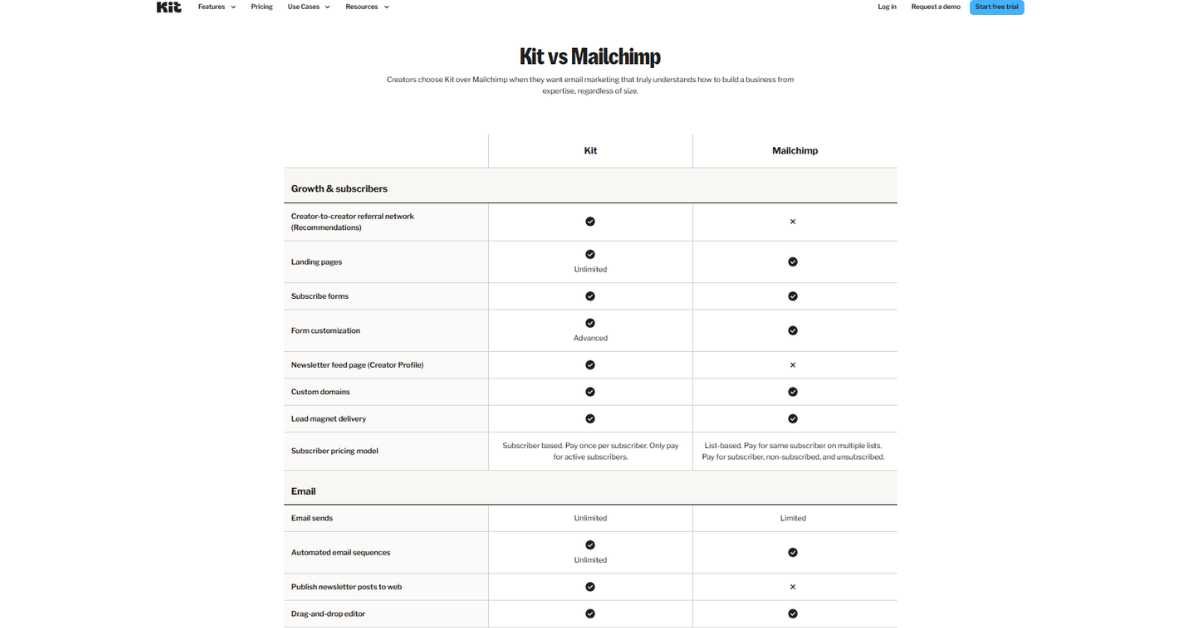
The Praises of Convert Kit vs. Mailchimp.
- Simpler Interface
- ConvertKit: Neat, minimalistic and simple to use.
- Mailchimp: More bloated, more difficult to learn.
- Winner: Without any doubt, ConvertKit.
- Better Automation Builder
- ConvertKit: Graphic editor, simpler to use.
- Mailchimp: More technical, more technical knowledge is needed.
- Winner: ConvertKit
- Subscriber-Based (Not List-Based)
- ConvertKit The tags cannot be duplicated, and one single subscriber can have several tags.
- Mailchimp: List based system will result in duplicate problems.
- Winner: ConvertKit
- Creator-Focused Features
- Convertkit: Sell online products, automatically deliver lead magnets.
- Mailchimp: Less creative, more general.
- Winner: ConvertKit
The creators were better supported.
- ConvertKit: Blog tools, creator school.
- Mailchimp: small business in general.
- Winner: ConvertKit
Mailchimp Strengths as compared to ConvertKit.
- More Email Templates
- Mailchimp: 100+ pro designed templates.
- ConvertKit: Simple templates (they are designed to be simple).
- Winner: Mailchimp
- Better Free Plan
- Mailchimp: 500 and less subscribers, has automation.
- ConvertKit: Up to 10,000 subscribers Non automation either.
- Victor: Mailchimp (which has fewer subscriber limit)
- More Integrations
- Mailchimp: 300+ native integrations
- ConvertKit: 100+ integrations
- Winner: Mailchimp
- Built-in CRM
- Mailchimp: Customer relationship management characteristics.
- ConvertKit: none of the CRM features.
- Winner: Mailchimp
- Better for E-commerce
- Mailchimp: Recommendation to products, abandoned cart, Shopify Integration.
- ConvertKit: Low-end commerce, not an e-commerce one.
- Winner: Mailchimp
Which Should You Choose?
Choose ConvertKit If-
- You are either a blogger, podcaster or creator of a course.
- You appreciate straight forwardness and not fancy features.
- You would like to sell email based products.
- You like a tag-based system of dealing with subscribers.
- You are ready to spend money on the improved automation.
Choose Mailchimp If-
Yes, you have an online store.
- You are in need of gorgeous email designs.
- You prefer having more free features.
- You should have widespread integrations.
- You have got a limited budget.
My Honest Recommendation-
To content creators- ConvertKit victors.
In the case of e-commerce companies- Mailchimp victors.
On a lean budget- The free plan of Mailchimp wins.
To be more simple and automated- ConvertKit wins.
You May also Like:- PluginsforWP Review- Best Site For GPL Plugins
Does ConvertKit Offer a Free Plan?
Yes! There is an option of a convertkit free plan of ConvertKit, still there are certain limitations to consider.
- Examples of what is found in the Free Plan of ConvertKit.
- Subscriber Limit- The number of subscribers is 1000 (extremely high)
- Email Sends- The unlimited broadcasts.
Free Features-
- Unlimited number of newsletters mailed.
- make an infinite number of landing pages.
- Build unlimited forms
Check and label subscribers
ovi Vendit products digitali (no ConvertKit fees)
- Basic reporting
- Community support
- Mobile-responsive templates
What is Missing in Free Plan?
Missing Key Features-
- None Automated Email: This is the greatest weakness.
- No Visual Automation Builder: Is not able to create automated sequences.
- No Integrations: It is not available to have any connections with Zapier, WordPress, etc.
- No Advanced Reporting: Simple statistics.
- Limited Support: Community Only No priority email support.
- No Newsletter Referral System Can not incentivize referral.
Is the Free Plan Worth The Hype?
Yes, If-
- New business (less than 10 thousand subscribers)
- All you have to do is to mail out newsletters manually.
- You do not even require automation.
- You would like to have a trial with ConvertKit prior to upgrade.
- Free landing page building You want to build landing pages.
No, If-
You require email automation (welcome sequences, etc.)
- No You desire to be integrated with other tools.
- NO You require auto delivery of lead magnets.
Free Plan Shortcomings Vs. Competitors.
Basic vs. Basic: ConvertKit Free to Mailchimp Free-
- ConvertKit: 10,000 subscribers, none of it is automated.
- Mailchimp: 500 subscribers, has basic automation.
Conclusion- That will be determined by the requirements – the automation offered by Mailchimp is worth getting.
On the one hand, ConvertKit Free vs MailerLite Free-
- ConvertKit: 10,000 subscribers, none of it is automated.
- MailerLite: 1, 000 subscribers, and automation is included.
Final conclusion- MailerLite more suitable in the beginning of automation.
It depends on the duration of the free plan.
Forever! The free plan of ConvertKit does not have time limitations. On it you may remain forever provided that-
- The number of your subscribers is less than 10,000.
- You can do away with automation capabilities.
- There is no need to have integrations.
You May also Like:- Top 5 GPL Websites Compared- Best for Plugins and Themes
Mailchimp vs ConvertKit: Which Email Marketing Platform is Right for You?
I have mentioned this above, however, let us go further in the debate of convertkit vs mailchimp using real-life situations.
Side-by-Side Feature Comparison
Email Automation-
- ConvertKit: Tag-based triggers, very intuitive, convertkit, builder of visual automation.
- Mailchimp: More complex, more powerful Customer journey builder.
- Winner: ConvertKit when it is simple and Mailchimp when the needs are advanced.
Email Templates-
- ConvertKit: the number of templates is about 20, text-based.
- Mailchimp: 100 fresh templates, design-centered.
- Mailchimp (by far) Winner.
Landing Page Builder-
- ConvertKit: Easy to use templates, will go fast.
- Mailchimp: More design, superior customisation.
- Winner: Tie (depends upon needs)
Forms and Pop-ups-
- ConvertKit: No frills, easy to install in any page.
- Mailchimp: Greater targeting capability, options on the design.
- Winner: ConvertKit because of the comfort, and Mailchimp because of the alternatives.
List Management-
- ConvertKit: One profile of subscribers, tags.
- Mailchimp: Dupes and list-based.
- Winner: ConvertKit (cleaning system)
Reporting and Analytics-
- ConvertKit: Simple reporting, which is simple to comprehend.
- Mailchimp: Analytics, At a deeper level.
- Winner: Mailchimp
Integrations-
- ConvertKit: 100+ integrations
- Mailchimp: 300+ integrations
- Winner: Mailchimp
Ease of Use-
- ConvertKit: Extremely simple, low level of learning.
- Mailchimp: More complicated, more difficult to learn.
- Winner: ConvertKit
Support-
- ConvertKit: Customer care, huge knowledge base.
- Mailchimp: Email and Bigger plans + chat, giant knowledge base.
- Winner: Tie
Application of the Theory in the Practical World.
The case of New Blogger (500 subscribers) is scenario 1.
Best Choice: Mailchimp
Why:Free plan has automation that ConvertKit does not.
Price: They are both the same, free and free respectively, although Mailchimp offers greater functionality.
Scenario 2: Course Maker (3, 000 subscribers)
Best Choice: ConvertKit
Annoyance: More automated delivery of courses, purer subscriber management.
Price: ConvertKit is less expensive than Mailchimp at $49/month.
Scenario 3 E-commerce Store (5,000 subscribers).
Best Choice: Mailchimp
Why: More improved e-commerce integrations, product suggestions, abandoned cart.
Price: 103/month (Mailchimp) compared to 79/month ( Convertkit).
Verdict: Mailchimp is an expensive entity but its e-commerce capabilities are worth the expenditure.
Scenario 4 Podcast Host (10,000 subscribers)
Best Choice: ConvertKit
Why: Tag-based management ideal in dividing the listeners into an area of interests.
Price: ConvertKit cost is 119/month as compared to Mailchimp at 175/month.
Migration Between Platforms
Moving and changing Mailchimp to the ConvertKit-
- Free migration help is availed by ConvertKit.
- Mailchimp subscribers who are also exported.
- Tag Imports ConvertKit with tags.
- Reports Rebuild automations (typically easier in ConvertKit)
- Timeline: complete migration will need 1-2 weeks.
Moving to Mailchimp at the expense of ConvertKit-
- Exporting subscribers and tags.
- Privacy Import into Mailchimp lists.
- Rebuild automations
- Redesign emails with email templates of Mailchimp.
- Duration: between 2-3 weeks (templates require more time)
My Opinion
Considerable focus ought to be given to the majority of content creators:
Winner: ConvertKit
- Broader user-friendly interface saves time of frustration.
- More improved automation of workflows by the creators.
- The Tag based management is purer.
- Worth the little more expensive price.
For E-commerce Businesses-
Winner: Mailchimp
- Better e-commerce integrations
- Recommendations that are essential in sales of products.
- The number of subscribers in plans increased.
- The cart features that are abandoned generate revenue.
To those who are beginners with regard to budget-
Winner: Mailchimp
- Free plan incorporates automation.
- Increased functions on the lower levels.
- Is able to always change later.
To Those Who take in earnest email marketing*
Competitor: Depends on Needs.
Creators → ConvertKit
E-commerce → Mailchimp
Agencies → Take into account ActiveCampaign or HubSpot.
You May also Like:- Top 7 Genuine Sites to Buy YouTube Subscribers?
What is ConvertKit API Used For?
The API (Application Programming Interface) of ConvertKit can enable the developers to connect to other applications and develop their own solutions. In this kind of case you have to know-
What is an API?
An API is some sort of a bridge, which is used to allow the various software programs to communicate with one another. Imagine it is some waiter in a restaurant-
- Food (data) You (your app) order.
- Order to kitchen Waiter (API) to Order to kitchen ConvertKit.
- Kitchen prepares it
- Waiter and serves your food (requested data)
Use Cases of ConvertKit API
Common Use Cases-
- Custom Integrations
- The ability to connect ConvertKit with apps that are not integrated.
- Create platform to platform workflows.
- Sync data automatically
- Add Subscribers Programmatically
- Add subscribers of your own app.
- Bring in data at the external databases.
- Design tailor made sign-up forms.
- Tags and Sequences Management
- Add/remove tags automatically
- Subscribe the users to certain sequences.
- Update subscriber information
- Retrieve Subscriber Data
- Pull subscriber lists
- Get subscriber details
- Send out export data to the other systems.
- Trigger Automations
- Instead of using manual sequences, it starts with automated sequences on external event occurrences.
- Subscribe tags depending on external actions of ConvertKit.
- Custom event tracking
- Custom Reporting
- The analytics and pull statistics.
- Create custom dashboards
- Track specific metrics
- Webhook Integrations
- Receive a notification of joining of subscribers.
- Monitor the opening of e-mails.
- Monitor form submissions
Who API- ConvertKit API is used by thousands of customers each day.
Developers and Agencies-
Custom workflow solution- Building: Custom solutions that are needed by clients with specialized workflow applications.
SaaS Companies-
The inclusion of ConvertKit in their product as an email service.
Advanced Users-
Designing personal automations, which are not included in the features of ConvertKit.
WordPress Plugin Developers-
Creating use case-specific ConvertKit plugins.
Is It Time to Have the API?
You need not have API when-
- You are with ConvertKit on a regular basis.
- No Existing integrations are in your favor.
- No No, you are not a developer.
- backwards Built-in features are what you want.
You MIGHT Need API In case-
- You require application integrations.
- ConvertKit You are developing a product that makes use of ConvertKit.
Checks and balances Existing integrations fail to deliver.
- You are having a developer in your team.
- You are making the complicated processes automated.
Access and Documentation API API Access and Documentation.
API Access-
- Like the free plan, available in any ConvertKit plan.
- Obtain API key in your settings of ConvertKit account.
- Custom code or automation Tools Use
Documentation-
ConvertKit has full API documentation in the developers.convertkit.com documentation of-
- Authentication
- Endpoints
- Request/response formats
- Code examples
- Rate limits
Options that are less challenging (Easier API Alternatives).
For Non-Developers-
These are simpler options, which should be used in lieu of API-
- Zapier
- No-code automation platform
- Connect ConvertKit with 5,000+ applications.
- Pre-built templates
- Visual workflow builder
- Make (formerly Integromat)
- Strengthened compared to Zapier.
- Visual automation builder
- Slightly more complex
- Native Integrations
- ConvertKit has 100 and more integrations.
- One-click setup
- No coding required
You May also Like:- Top 7 Sites to Buy TikTok Followers For Free
Kit vs Top Alternatives (2026 Comparison)
| Features | Kit (ConvertKit) | Mailchimp | MailerLite |
| Best For | Creators, Bloggers, Coaches | E-commerce, Small Agencies | Beginners, Budget Users |
| Free Plan | Up to 10,000 subscribers (Basic) | Up to 500 subscribers | Up to 1,000 subscribers |
| Visual Automations | Very Advanced & Intuitive | Good, but complex | Basic to Moderate |
| Landing Pages | High-converting, Creator-focused | Standard Templates | Clean & Simple |
| E-commerce Integration | Direct Digital Product Sales | Shopify/WooCommerce Heavy | Basic integrations |
| Pricing (1k Subs) | ~$29/month | ~$45/month | ~$15/month |
You May also Like:- 7 Best Sites to Buy X (Twitter) Followers Safely
Kit (ConvertKit) Pros and Cons?
Pros
- Incredibly Simple Interface
It is the largest strength of ConvertKit- In case, you have ever had a sense of being overwhelmed by Mailchimp or ActiveCampaign, then ConvertKit is a breath of fresh air. Everything is just as you imagine it to be.
Real World Comparison- It was possible to create my first automated welcome sequence in ConvertKit in 10 minutes. In Mailchimp, it only required me 45 minutes to do the same task since I was not able to understand their interface.
- Tag-Based Subscriber Management
There will be no more need to handle numerous lists and deal with subscribers who are already present. There are several tags on one subscriber. It would be logical to do so.
- Visual Automation Builder
The automation builder is a strong and user friendly one. The whole process of automation is visible in a single glance and hence easy to optimize and troubleshoot.
- Creator-Focused Features
- Market online products directly.
- Provision of lead magnets automatically.
- No code-based landing page constructions.
- Design forms which really work.
Such amenities are constructed by creators, rather than those who might want to utilize it.
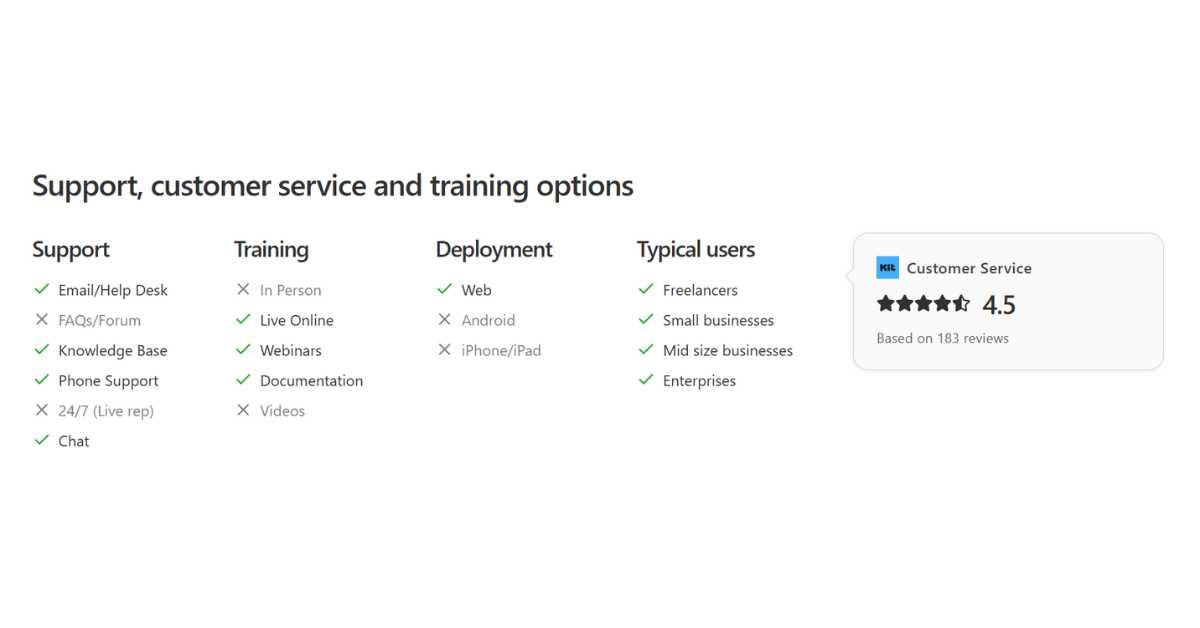
- Good Documentation and Support
The help articles of ConvertKit are understandable and useful. Their blog also educates the email marketing not only how to use their tool.
- Reliable Deliverability
I always use my emails and they do not end up in the spam box. At ConvertKit, email providers have good relationships.
- Trade Characteristics 0% Commission
The fact that it is possible to sell digital products without any transaction fees (which is merely the normal charges that Just Stripe charges) is of great value.
- Migration Support
ConvertKit is free to transfer subscribers to other platforms. This eliminates a significant change of brand.
Cons
- Limited Email Templates
ConvertKit is a company which deals with the text-based email, which is alright when it comes to newsletters but the designs are not that beautiful. There are approximately 20 templates which are rather simple.
Frustration Case Study- Desired to make a product launch mail which was eye-catching. Necessity to design it with Canva and insert as an image since what I wanted to do was not possible with the templates of ConvertKit.
- No Built-in CRM
You will have to have a different CRM tool, in case you are to manage the relationships with the customers other than through email. The ConvertKit captures email related information only.
- It is costly in relation to a few other options
That is a reasonable but not a cheap price of the 1,000 subscribers, which is priced at $29/month. The same is offered at MailerLite at a rate of $10/month.
- Basic Reporting
You receive the basic metrics (open rates, click rates etc.) however, sophisticated analytics involve exports and other third-party tools.
- Free Plan Lacks Major Features
The free option is quite liberal since it has 10,000 subscribers yet it does not have automation, which is the primary purpose of using ConvertKit. Majority of the users need to upgrade within a short duration.
- Free Plan No Free Plan A/B Testing
Split testing emails or landing pages are not free but they are in paid plan. This is included in free plans by other competitors such as Mailchimp.
- Weak Integrations In comparison to Mailchimp
The 100+ integrations are also good, but not as numerous as the 300 plus of Mailchimp. There are niche tools which do not connect directly.
Rating: 4.3/5 Stars ⭐⭐⭐⭐
Nevertheless, in the case of an e-commerce shop, when it comes to a pretty email template, or when your budget is small, look for other options.
You May also Like:- GPL Chimp Review- Best GPL Plugins and Theme Site
Is Kit the Right Newsletter Service for You?
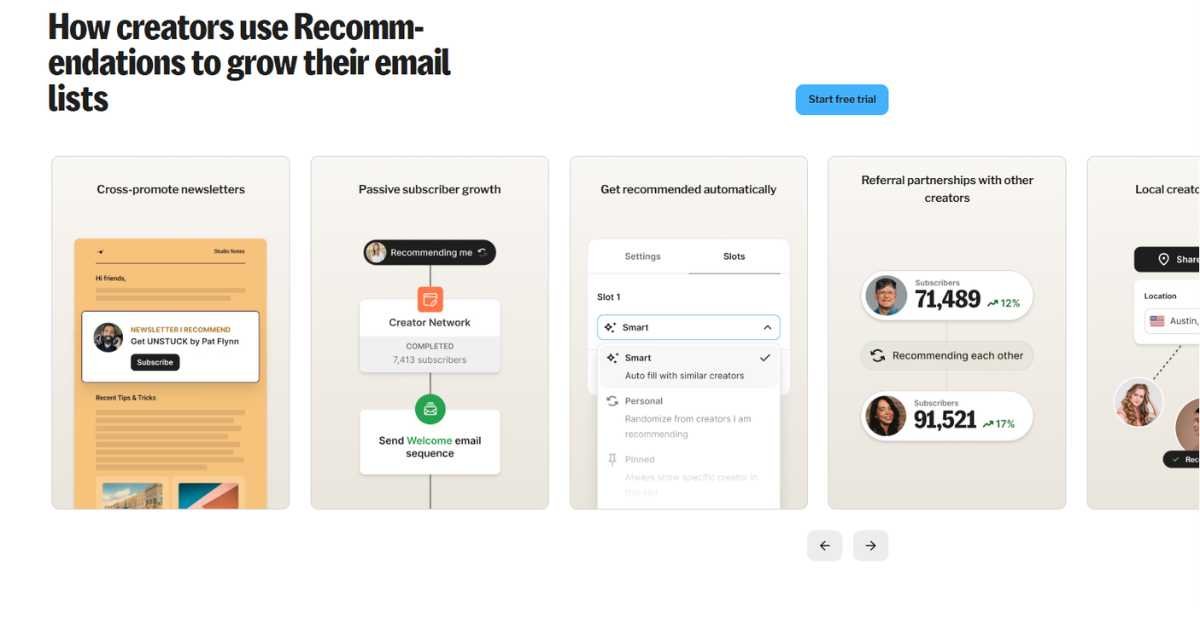
Would you like me to support you in making the decision concerning whether ConvertKit (Kit) will suit your particular situation or not?
You are in Agreement with Kit because-
- Sure you are a Content Creator
Blogger, podcaster, YouTuber, course creator Kit is made of YouTuber, course creator, podcaster, and Blogger. All the things regarding the platform presuppose that you are producing content and gaining a following around it.
2. You Like things to be simple and not complex.
Kit will be feeling like a breath of fresh air compared to Mailchimp or the feeling of being torn apart by the heels of ActiveCampaign.
3. You Want to Sell Digital Products
Selling eBooks, courses, templates is not hard, and Kit Commerce allows doing it via email. No transaction charges is a great temptation.
4. Sure You’ll Use Email Automation
It is at its best in the automation of Kit. Kit can easily do this in case you are developing welcome sequences, automated courses or nurture campaigns.
5. You Like Text-Oriented Emails
In case you are comfortable with basic email newsletters (the majority of them are written in text), you will not be bothered by the restrictions of the template offered by Kit.
6. You Have 1,000+ Subscribers
At this stage, we can justify the cost of the investment of $29/month in case you are selling your list.
You Should SKIP Kit In case-
- No You have an E-commerce Store.
It would be wiser to use the Mailchimp, Drip or Klaviyo, which have product recommendations, abandoned cart and other Shopify integrations.
2. No You should have Beautiful Email Designs
In case the visual design is an essential requirement (fashion, lifestyle, design niches), it is the best to operate under Flodesk or use the templates of Mailchimp. You can Read the comparison of kit and flodesk.
2. NO if You have a Very Tight Budget
MailerLite has similar features and costs as Kit at the price of 10 months a month compared to 29 months at Kit. It is a savings of $228/year that is significant at the beginning.
3. NO You Send Newsletters Rarely.
In the case you are simply updating every month and you are not automating, then the free plan of Kit would work, however, the free plan of Mailchimp has automation.
4. NO You Have to have Advanced CRM features.
Kit is email-only. ActiveCampaign or HubSpot works well in the event that you have to control customer relations, sales pipelines or deal tracking.
5. Less Than 500 Subscribers
Both Mailchimp and MailerLite have free plans (both with automation) to start with. Change to Kit when you have grown big of them.
6. You Are Simply Testing Email Marketing
The first free tool is Mailchimp, MailerLite, or the free plan of Kit. You should not spend money on Kit yet you have not decided to become an email marketer.
Decision Framework
The following are the questions that need to be asked-
Question 1. What is my major business model?
- Content creator → Kit
- E-commerce → Mailchimp/Klaviyo
- Service business → ActiveCampaign
- Mixed or Kit or Mailchimp.
- How much money do I have to spend each month?
- Under $20/month → MailerLite
- Between 20-50/month – Kit or Mailchimp.
- Suing $50+ and above Any tool, features by feature.
- What is the significance of the email design?
- Not important (text newsletters) Kit.
- Somewhat important → Mailchimp
- Very important → Flodesk
- Am I in need of automation?
- Yes, necessary→ Kit (paid) or MailerLite.
- No, breaking news only → Free plan of any kind.
- Yes, however, free plan of Mailchimp.
- What is the number of subscribers that I have?
- Under 500 → Mailchimp free
- 500-1,000 → MailerLite or Kit
- 1,000-10,000 → Kit if monetizing
- 10,000 and above 10,000 and above Kit or enterprise solution.
My Honest Recommendation
First of all, there is a Free Plan-
- The package of less than 500 subs: Mailchimp free (with automation).
- 500- 1000 subs: MailerLite free (incl automation)
- 1,000-10,000 subs Kit free (unless automation is necessary)
Option Upgrade: When-
- You are prepared to make the move towards automating.
- You are selling out your email list.
- You must have tag based subscriber management.
- Everything is simple and at least it is cheap.
- You are bumped off on free plans.
Selection of Kit: Start If-
- You are a serious creator since you were born.
- You have the budget of $29/month.
- You have been moving off of a different platform.
- You appreciate austerity above all.
You May also Like:- How to Get Free Instagram Views Organically (Proven Methods)
Conclusion
Having used the product daily over the last 6 months, trying out all of its functions, looking through different alternatives, and having run numerous email campaigns, here is my final judgement, which is not biased-
Is it Worth It to Content Creators? ConvertKit is the Real Deal. The easiness, the ability to automate and creator-oriented features save hours of time and headaches. As a blogger, podcaster, or course producer, the monthly cost of $29 investment will be recovered soon.
In the case of E-commerce Business: Bypass ConvertKit and settle on Mailchimp, Klaviyo or Drip.
They are e-commerce friendly with product suggestions, abandoned carts, and enhanced integration with Shopify.
On Budget- To begin with, MailerLite has a free option or Mailchimp has a free option- both of them have automation, which the free plan of ConvertKit does not have. When you are monetising your email list Switch to ConvertKit.
To Established Creators: In case you are making $500 and above/month off your email list, ConvertKit is worth its $29-119/month fee. It will be able to scale faster using the time savings and improved automation.
The Bottom Line-
ConvertKit is not a perfect choice- it is quite costly to use than some other options and has few possibilities to design emails.
However, to creators who are after simplicity, potent automation and increasing their audience, it is among the best email marketing instruments in 2026.
My Recommendation-
Free Plan- This is where you begin when you are less than 10,000 subscribers, and do not require automation as yet.
Creator Plan- Automation. When you are ready to automate or reach subscriber limits.
Alternative- MailerLite is the first one that should be tried in case budget is your priority.
The appropriate email marketing tool will rely on your unique needs, financial resources, and business model.
Kit is a great platform when you are a creator- and, in this case, it is worth serious consideration.
FAQ
ConvertKit is an email marketing automation system specifically aimed at creators. It assists bloggers, podcasters, course creators, and online entrepreneurs to build their email lists, dispatch newsletters, email series, and digital products and earn income through email.
It is mainly used to establish and maintain relationships with subscribers through automated and broadcast e-mails.
ConvertKit has a free plan of up to 10,000 subscribers. The free plan is based on unlimited email broadcasting, landing pages, forms and bare-bones management.
But it does not have email automation, integrations and higher-level reporting- which are the most powerful of the features in ConvertKit.
The majority of the users begin with the free plan and upgrade to the Creator plan ($29/month) as they require automation.
Kit (previously ConvertKit) continues to have a free plan in 2026. The free version has a limit of 10,000 subscribers and does not have a limit on the number of emails sent, landing pages and forms.
Nonetheless, those automation features, integrations, priority support, etc., need to be upgraded to a paid plan.
The free plan is truly a free option that is not time-limited and has no need of credit cards.
MailerLite is more affordable when on a small budget- it is much cheaper (10/month compared to 29/month with 1 000 subscribers) and the free option comes with automation.
The choice depends on what you want in terms of simplicity, tag-based subscriber control, and the content creator is a serious who is prepared to pay a little bit extra to get a content-driven platform.
For beginners- MailerLite. To the well-established creators: ConvertKit.
As a content creator: Yes, Kit is superior to Mailchimp. It is less complex and easier to use, has superior automation builder and tag-based management of subscribers.
In the case of e-commerce companies- No, Mailchimp is superior and it has better e-commerce integrations, product recommendations and designs.
In the case of users with a tight budget- in the free version of Mailchimp, automation is available, whereas it is not in Kit, so it is more suitable as a first-time user.
Yes, Kit (ConvertKit) can be fully considered legitimate and trustworthy. It was established in 2013 and has more than 600,000 creators on the platform as well as millions of email responses every day.
It is an old established company with good email delivery, great customer service and customers are satisfied with it.
The use of Kit is the main email marketing tool used by many successful online creators and bloggers.
MailerLite (less expensive, awesome free version), Mailchimp (e-commerce preferred), ActiveCampaign (more advanced automation), Flodesk (pretty email designs), Drip (e-commerce oriented), and Systeme.io (all-in-one solution) are the best Kit alternatives.
Select them according to your budgets, the nature of business and your requirements. All of the alternatives possess various advantages to Kit.
ConvertKit is free (up to 10,000 subscribers, only a few features).
The Creator plan is available at $15/month with 300 subscribers, $29/month with 1000 subscribers, 49/month with 3,000 subscribers and 119/month with 10,000 subscribers.
The prices of Creator Pro plan are approximately twice the Creator plan prices and have a priority support and advanced features. Precise pricing will be based on the number of subscribers.
The 60/40 rule of email marketing dictates that 60 percent of your emails have to be valuable (educational, entertaining, useful information) with the other 40 percent being promotional (sales messages, product promotions).
This ratio will ensure that subscribers remain hooked and that they do not unsubscribe.
The software at ConvertKit allows to balance value and promotion email messages with the help of automated sequences and the broadcast schedule.
Adherence to this rule will enhance open rates and retention by the subscribers.

On WebJinnee, I share practical and easy-to-understand content about SEO, WordPress, digital marketing, website growth, and online AI tools.

1 thought on “What is Kit? Features, Pricing and Honest Review”
Comments are closed.