

Despite being one of the latest trends in digital marketing, email continues to produce the highest profitability of all digital marketing channels- $36 to $42 per dollar, according to Omnisend.
Table of Contents
ToggleHowever, this is subject to the platform of your business model.
Kit and Mailchimp are two of the most comparable email marketing software in the world, it’s not surprising that there’s a lot of confusion.
Both have the ability to create a list, send campaigns, and set up automations. But each type of user relies on a different type of device and selecting the wrong model will slow you down.
As part of my own experience with Kit on webjinnee.com, I’ve been able to manage newsletter subscribers, automate interactions, and even sell my digital products.
So, this article will provide you with facts and the ultimate truth about Kit vs Mailchimp in terms of pricing, automation, deliverability, design, and what makes sense for your business in 2026.
Quick answer: Kit is ideal for creators, bloggers, newsletter publishers and anyone selling a digital product. For small businesses and e-commerce brands that seek all-in-one functionality, Mailchimp is a suitable solution.
You May also Like:- Best Gpl Sites For WordPress Plugins and Themes
Kit vs Mailchimp- Which is Better Tool?
| Data Point | Kit | Mailchimp |
| Founded | 2013 (rebranded 2024) | 2001 |
| Active users | 600,000+ creators | 14 million+ users |
| Acquired by | Independent | Intuit ($12B, 2021) |
| Free plan | Up to 10,000 subscribers | 250 contacts, 500 sends/month (2026) |
| Deliverability rating | 4/5 stars (EmailToolTester 2026) | 3/5 stars (EmailToolTester 2026) |
| Claimed delivery rate | 99.80% | 99%+ |
| Creator commerce | Built-in (even on free plan) | Not available |
| Subscriber model | Tag-based (no duplicate billing) | List-based (counts unsubscribed contacts) |
| G2 rating | 4.4/5 | 4.4/5 |
| Best for | Creators, bloggers, newsletter businesses | Small businesses, e-commerce, marketing teams |
What Is Kit (ConvertKit)?
Kit (formerly ConvertKit) is an email marketing tool designed for creators. It was founded in 2013 by Nathan Barry, who later changed its name to Kit in late 2024, though it is still searchable as ConvertKit.
Your list should be your greatest business asset and your platform should be designed to make it easy to create, grow and profit from it-that is the foundation of Kit’s approach.
It’s based on tag-based subscriber management, automations based on behaviour, and a built-in commerce solution that features a way for creators to sell digital assets without having to sign up to a different platform.
At the moment, Kit strengthens over 600,000 creators globally and has enabled over $500 million in creator earnings via commerce capabilities as of 2026.
Whereas most competitors don’t offer the same level of transparency, Kit publishes reports of email deliverability and claims a 99.8% delivery rate.
My experience on Webjinnee- When I switched to Kit, I found list-based platforms annoying to manage. My understanding of the kit’s tagging system made managing the subscriptions easy.
I can split my audience into who clicked on my listing, who downloaded from my listing, and who bought from my listing, without paying twice for the same subscriber, and without having to duplicate contacts.
If you are running a content and affiliate website such as webjinnee.com, then this is the type of tool you require.
You May also Like:- What is Kit? Features, Pricing and Honest Review
What Is Mailchimp?
One of the most famous email marketing platforms on the market is Mailchimp, which debuted in 2001.
It was bought by Intuit in November 2021 for nearly $12 billion making it one of the largest SaaS acquisitions in history, and has grown from a standalone newsletter tool into an all-in-one marketing platform.
Mailchimp is built for small businesses, e-commerce companies, and marketing teams who require all of their marketing tools in one place, from email campaigns to landing page templates to audience segmentation, to social ads to SMS.
By 2026, Mailchimp is expected to have around 14 million users, which makes it the obvious first choice for many new to email marketing.
As shown in TechnologyChecker’s 2026 market share data, though, Mailchimp isn’t gaining the ground that it once did, as specialized platforms like Klaviyo (which has won more than 20,000 businesses over from Mailchimp in the last few years) and creator-focused platforms like Kit are taking it.
You May also Like:- Kit vs Flodesk: Which Email Marketing Tool Is Better?
Kit vs Mailchimp Pricing (2026)
This is one of the most important sections of this comparison- and the one where the real differences become clear.
Kit Pricing 2026
Kit has three plans-
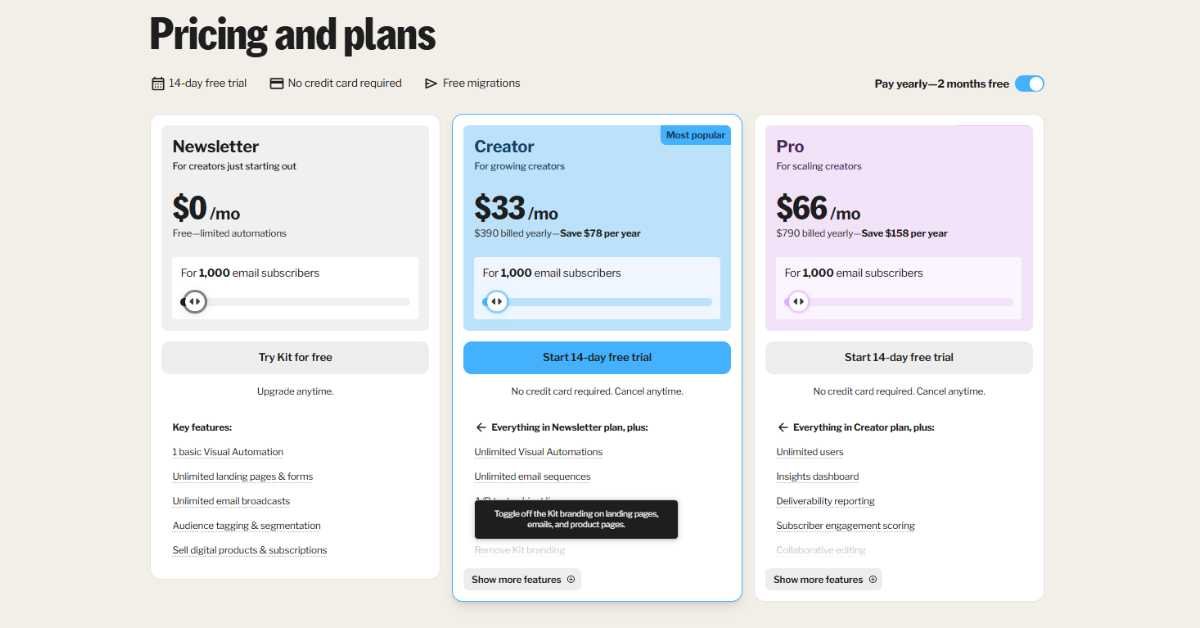
| Plan | Monthly Price | Annual Price | Subscribers |
| Newsletter (Free) | $0/mo | $0 | Up to 10,000 |
| Creator | $33/mo | $390/year (saves $78) | Starts at 1,000 |
| Pro | $66/mo | $790/year (saves $158) | Starts at 1,000 |
Newsletter (Free) includes-
- 1 basic Visual Automation
- Unlimited landing pages and forms
- Unlimited email broadcasts
- Tagging and segmentation of audience.
- Offer digital products and subscriptions.
Creator plan ($33/mo) includes-
- Unlimited Visual Automations
- Unlimited email sequences
- Do A/B test subject lines.Test subject line using A/B.
- Subscriber polls
- Remove Kit branding
- Apps and integrations
- RSS campaigns
- Email support and Chat support 24/7
Pro plan ($66/mo) includes-
- Unlimited users
- Insights dashboard
- Deliverability reporting
- Subscriber engagement scoring
- Facebook custom audiences
- Newsletter referral system
- Collaborative editing
- Test a variety of subject lines and content.
- 24/7 priority support
Important note- Kit’s September 2026 price increase tripled the Creator plan to $33/mo from $15/mo, which is a big increase at the entry-level.
This makes it more expensive than Mailchimp at the basic level, but Kit’s free plan is more generous. Owning a business is a hectic and equally demanding task. (Source: StartupOwl ConvertKit vs Mailchimp 2026)
You May also Like:- What is Kit? Features, Pricing and Honest Review
Email ROI Calculator
Calculate your email ROI right now
Fill in the campaign number(s) below. You will receive your ROI, profit, cost per subscriber and some notes on what the numbers are and what they mean.
How to Calculate Email ROI?
ROI = ((Revenue − Cost) ÷ Cost) × 100
Example- A campaign that cost $500 and generated $3,000 in revenue returned $2,500 in profit, that’s a 500% ROI. Every dollar you spent brought back six dollars.
Your return on investment is most likely not where you think it’s broken, it’s either in your open rate (subject line), click rate (body of the email and call to action), or your conversion rate (landing page).
The calculator tips on the full version break down to figure out which one to fix first according to your actual numbers.
Mailchimp Pricing (2026)
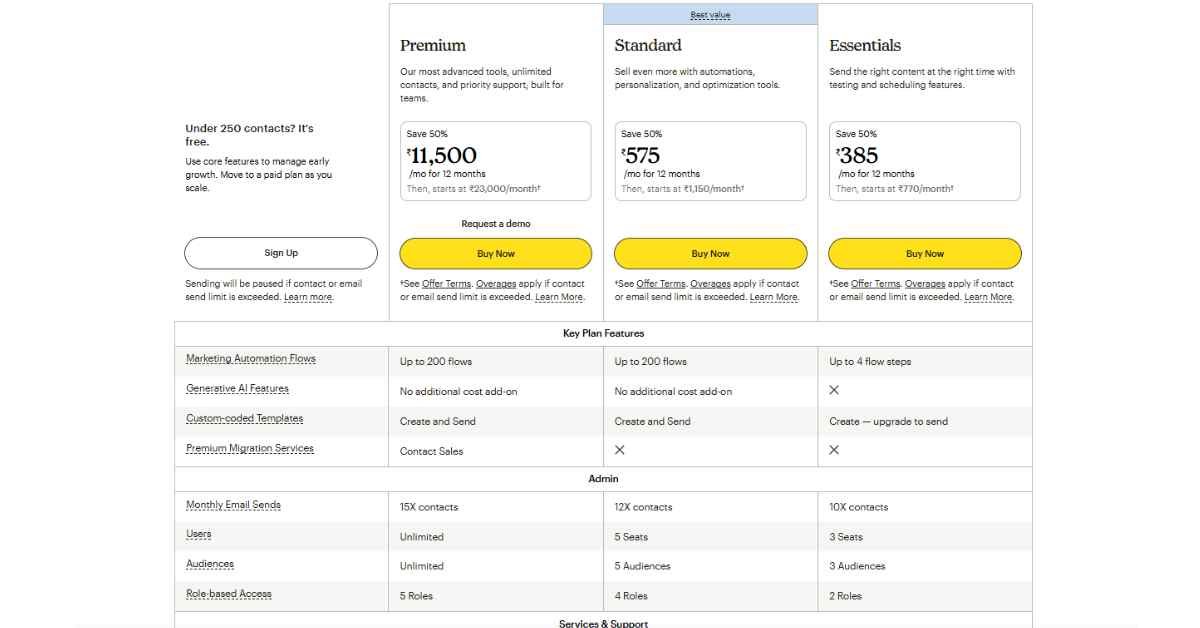
| Plan | Price at 500 Contacts | Price at 5,000 Contacts | Price at 10,000 Contacts | Core Feature Trap |
| Free | $0/mo | N/A | N/A | Capped at 250 contacts, 500 sends/mo max |
| Essentials | $13/mo | $75/mo | $110/mo | Only basic email; no multi-step automation |
| Standard | $20/mo | $100/mo | $165/mo | Required tier for full Customer Journeys |
| Premium | $350/mo | $350/mo | $370/mo | Advanced multivariate testing & phone support |
Mailchimp free plan (2026): 250 contacts only and 500 monthly sends- down from 500 contacts and 1,000 sends in 2023, and down from 2,000 contacts in 2022.
No automation. No scheduling. Every mail sent by Mailchimp will be branded as such. Limited First 30 Day Support.
Critical Mailchimp pricing issues to know-
Mailchimp does not count un-subscribed contacts toward your billable quantity of contacts. All contacts you’ve ever imported, including those that have “opted out,” add up to your tier.
There are additional expenses to consider. Retainful’s research for 2026 shows that the actual costs of Mailchimp are actually between 20-40% more than the advertised rates, due to inactive contacts, SMS add-ons, transactional email blocks, and overage fees.
Standard plan is required for automation. One core feature of Mailchimp, called Customer Journey Builder, is missing from their Free and Essentials plans. Multi-step automations are only available at $20/mo (Standard).
Price increases since Intuit’s purchase. Since 2021, when Intuit acquired Mailchimp, the price of the platform has increased almost every year and the number of emails in free plans has dropped.
The free plan went from 2,000 contacts in 2022 to 250 in 2026. In April 2026, older accounts were impacted by a plan price increase of 11-13%. (Source: Retainful Mailchimp Pricing 2026, Benchmarkemail 2026)
You May also Like:- Best 5 Sites to Buy Google Reviews
Pricing Verdict
If you have no experience in programming then Kit is a huge winner. The free plan allows you to have up to 10,000 subscribers and actually use real features; meaning unlimited broadcasts, landing pages, automations, even product sales! The Mailchimp free plan has now become a demo.
If you have a small list (fewer than 5,000 subscribers) and are sticking to basic email functions, then Mailchimp Essentials may be the more affordable plan ($13/mo) compared to Kit Creator ($33/mo). However, for automation you need to upgrade to Standard ($20/mo).
For lists of 10,000 or more subscribers: Costs merge and then split. Mailchimp Standard costs about $100/month at 10,000 contacts.
The price of Mailchimp Standard at 10,000 contacts is around $100/month. Also scaling is supported by Kit Creator with 10,000 subscribers- compare both based on your exact list size before you can make a decision.
Pricing summary: If you’re at square zero, Kit’s free plan is the greatest bargain of the industry. At small list sizes, Essentials plan is more affordable for small businesses that require only essential email campaigns and are not minded about Mailchimp’s limitations.
Kit vs Mailchimp: Free Plan Comparison
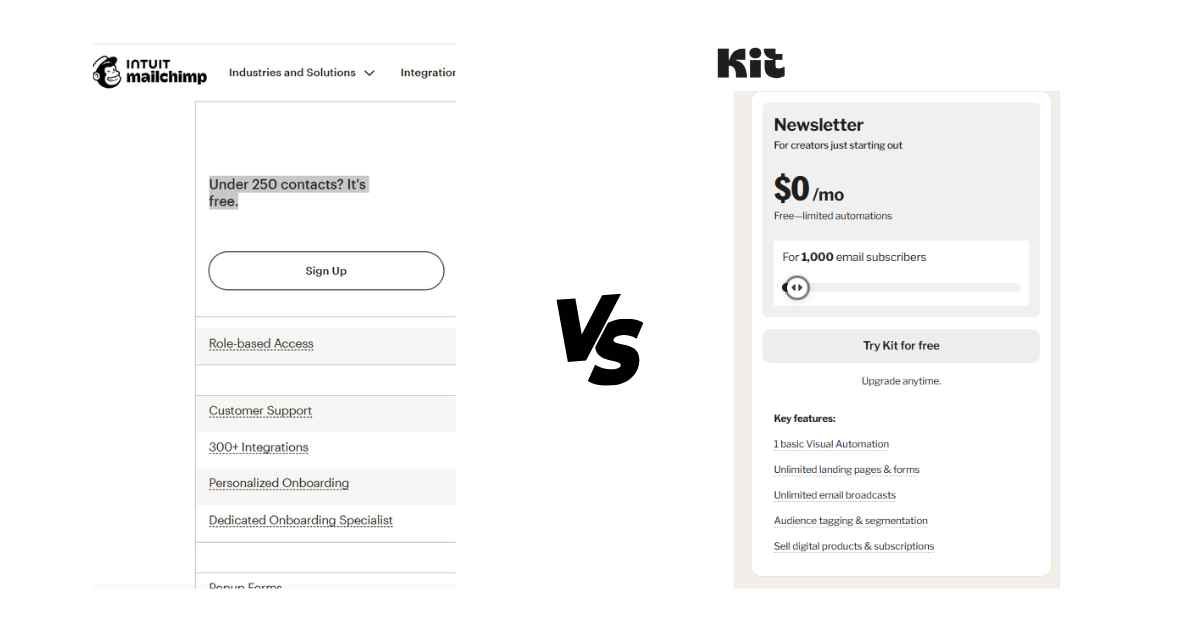
| Feature | Kit Free | Mailchimp Free |
| Subscriber limit | 10,000 | 250 contacts |
| Monthly email sends | Unlimited | 500 |
| Automation | 1 basic visual automation | None |
| Landing pages | Unlimited | Basic |
| Forms | Unlimited | Basic |
| Sell digital products | Yes | No |
| Platform branding | Yes | Yes |
| Credit card required | No | No |
| Support duration | Ongoing | 30 days only |
Winner- Kit, not even close. Kit’s free plan is among the most generous plans is available in the e-mail marketing field.
Before you spend a single rupee, you can create a list of 10,000 subscribers, send unlimited emails, have unlimited automations and sell products. The 2026 free plan on Mailchimp isn’t a viable option for most users.
You May also Like:- WorldPressIT Review- GPL Plugins and Themes for WordPress
Kit vs Mailchimp: Ease of Use
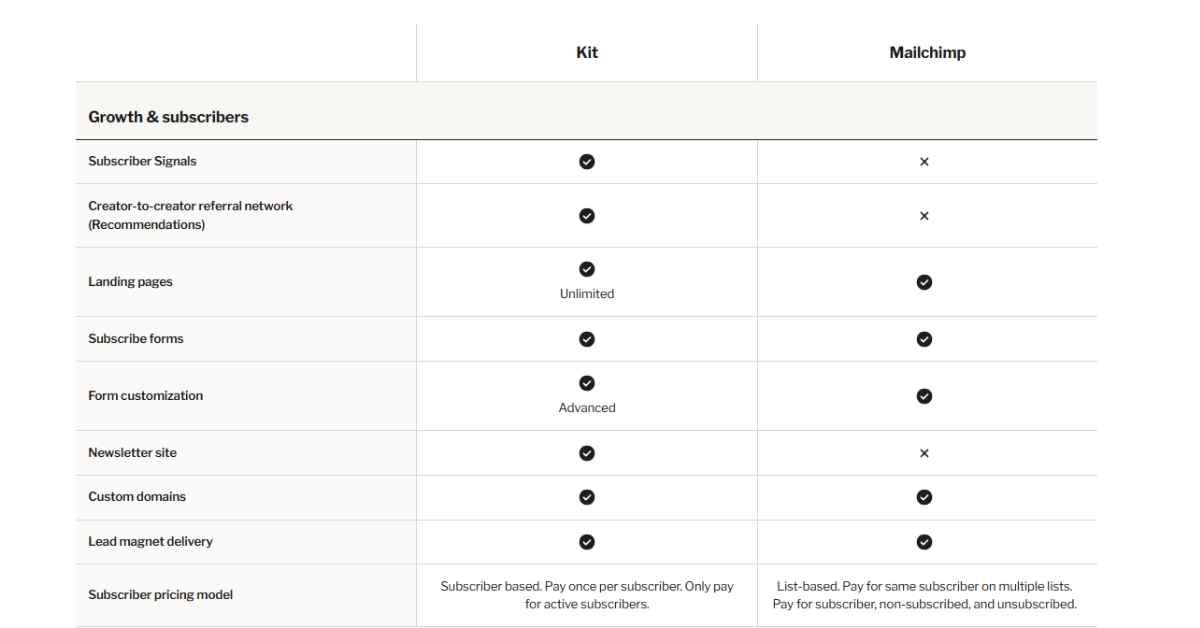
Accessibility is the goal of both platforms, but they are very different when you’re using them.
Kit’s foundation is simple core concepts: subscribers, tags, sequences, and automations. After this one session, all makes sense because you have grasped these 4 ideas.
The interface is clear and efficient. No clutter, no feature overload, no feature mashing when it comes to managing lists.
2026 Tech Update- In May 2026, Kit rolled out Kit MCP (Model Context Protocol). It allows creators to handle their live broadcast drafts, review tagging rules, and utilize the AI assistant’s command to check audience segments, right from the live broadcast. The AI features of Mailchimp are still contained within their paid Intuit data dashboard.
Mailchimp is more complex due to its ambitions- it takes longer to learn. The interface is no longer just an email solution, and that’s reflected in the navigation.
If your main use for email marketing is mailing lists, you might end up feeling like you’re working around functions you don’t need within Mailchimp.
Ease to use contributes 20% to the platform mark, which is the highest mark achieved by Kit especially when it comes to those who market solely via email.
Ease to use is a major factor in the platform mark and is what gives Kit a higher score for this attribute particularly with users having narrowly targeted email marketing methods.
Winner: Kit is easier to use for creators and newsletter businesses. As a service, Mailchimp is well-known among small businesses that are already utilizing it, but can be a bit of a hassle for those looking to focus on a specific experience.
You May also Like:- Top 10 Group Buy SEO Tools Providers list
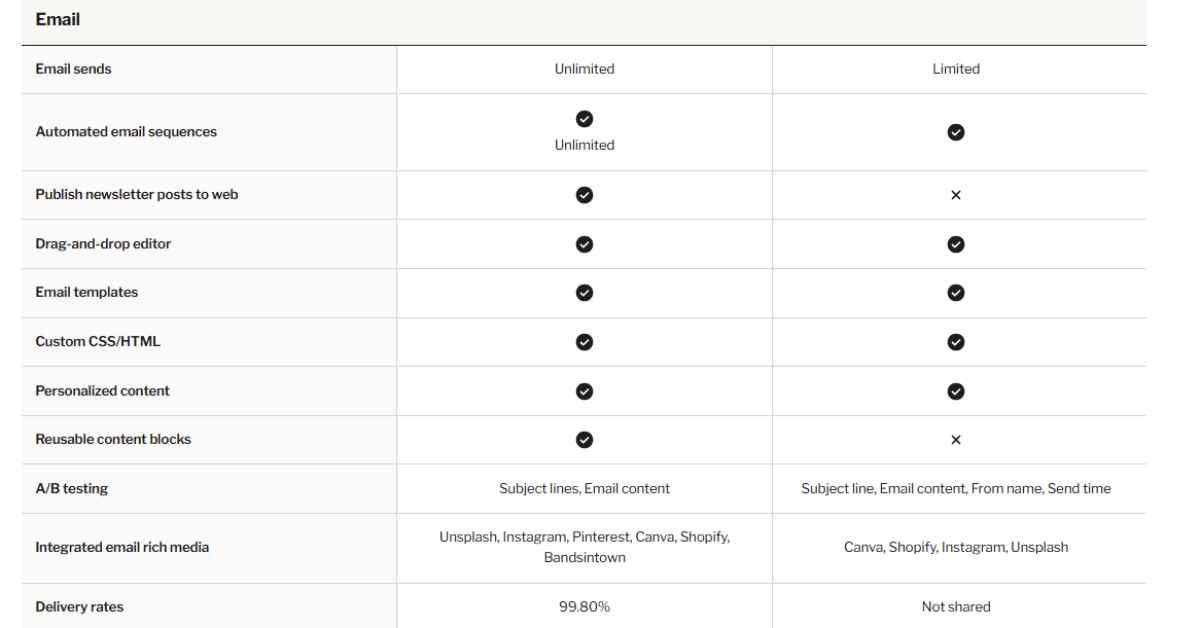
Kit vs Mailchimp: Email Design and Templates
It is in this area of automation that Kit really shines for creator businesses.
Kit’s automation focuses on subscriber behaviour and tags. It’s possible to create visual workflows that will start whenever a subscriber opens an email, clicks a link, buys something, fills out a form, or is tagged. Dedicated customer journeys are personalized, relevant and timely.
On Kit, you can write an automation e.g., If a user downloads your WordPress plugin guide, tag them with WordPress user, add them to a 5-email WordPress sequence and after 7 days, offer your premium WordPress course. This is the type of logic that Kit excels at.
Mailchimp automation (also known as Customer Journey Builder) only appears on the Standard plan up. It’s more campaign-oriented in nature than behavior-oriented- more good for business workflows such as welcome sequences, promotional drip sequences and e-commerce triggers (abandoned cart, post purchase etc.).
SendPulse’s 2026 test revealed that automation features account for 15% of its total platform evaluation weight value, while Kit’s rating is better for automation depth that is useful specifically for a creator.
Squeeze the automation advantage when creating content for creators and newsletter companies: Verdict – Yes, kit does. For eCommerce and other types of business marketing, the automation that Mailchimp offers is sufficient, and it starts at $20/month.
Which Tool Has Better Email Automation?
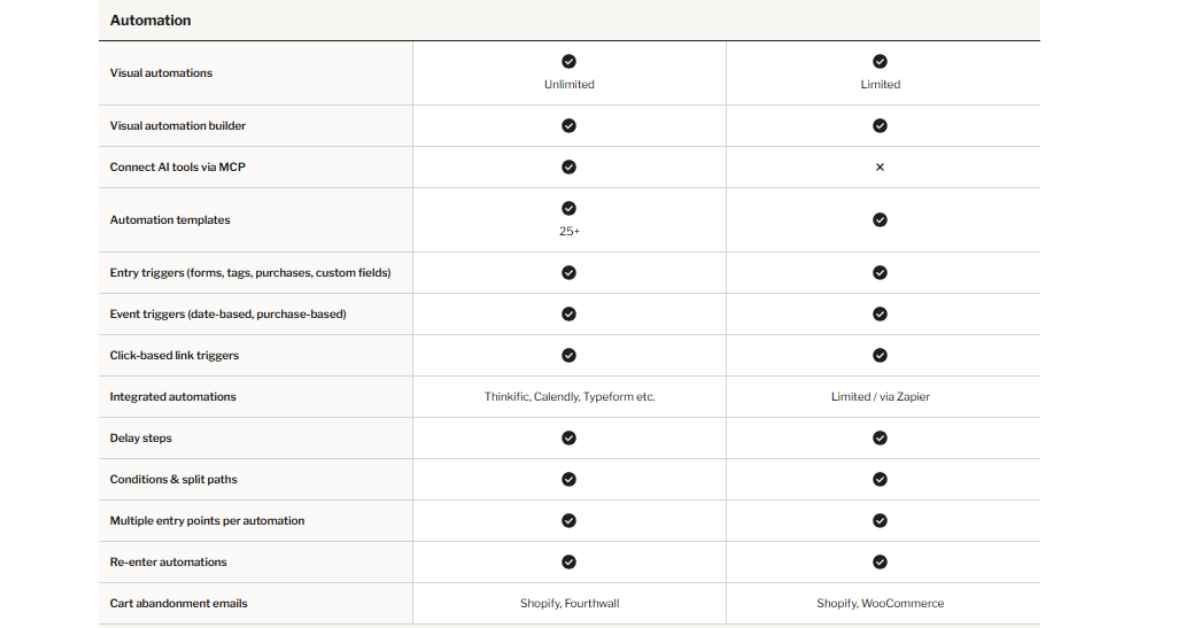
Kit’s biggest competitive edge for creator businesses is automation.
Kit’s automation revolves around behaviour and tags. Create visual workflows that start when subscribers open an email, click on a link, make a purchase, fill out a form, or get tagged. It creates a very personalized subscriber journey that’s relevant and timely.
For instance, on Kit, you could set up an automation that will point out: if somebody downloads my WordPress plugin guide, label them with ‘WordPress user,’ drop them into a 5-email WordPress sequence, then 7 days later present them my premium WordPress course. This is the type of logic that is the strongest thing about Kit.
Automation (Customer Journey Builder) is only possible on the Standard plan and higher. It’s more campaign focused and not so much behavior focused — would work better in business workflows such as welcome sequences, promotional drip campaigns, abandoned cart, post-purchase, etc.
In a 2026 test conducted by SendPulse, automation features accounted for 15% of the total platform assessment weight – and in the case of Kit, the depth of the automation features is creator-specific.
Winner: Kit is a winner with automation for creators and newsletter businesses. For businesses with ecommerce and business marketing needs, Mailchimp’s automation is sufficient and needs a minimum of the $20/month Standard plan.
You May also Like:- GPL Chimp Review- Best GPL Plugins and Theme Site
Kit vs Mailchimp: Deliverability and Inbox Placement
Deliverability is simply the percentage of emails that get delivered to the inbox instead of the spam folder. It’s more important than nearly any other metric; an email sent is useless if it never reaches your subscriber.
EmailToolTester’s data shows that Kit performs significantly better on deliverability, with an average of 4% to 5% more emails reaching the Primary tab of user inbox as opposed to Promotion tab or spam filters.
Kit’s tag-based, one-list approach is immune from duplicate contact and engagement dilution issues that may plague list-based platforms such as Mailchimp. Kit also has its own deliverability reports, which boast 99.8% delivery rates, ushering in a level of transparency that engenders sender trust.
Because Mailchimp’s free plan does use shared IP address, it’s possible that deliverability may be compromised, depending on the sending behavior of other users sharing that IP address. On paid plans, dedicated IPs are available.
Google, Microsoft, Yahoo, and Apple account for 77% of all email — in other words, the choices of how these four mail providers distribute your email into your inbox or spam folder make all the difference for email marketing.
Winner: Kit on the matter of deliveries. Kit’s increased deliverability score is a real benefit for creator or newsletter-specific businesses that value every subscriber relationship.
Kit vs Mailchimp: Landing Pages and Forms
Both platforms offer landing page and opt-in form builders.
Kit’s landing pages are purposeful with a conversion in mind. Not the most pretty, but they have quick loading times and a great ability to grow your subscriber list. Another excellent feature for bloggers and content sites such as webjinnee.com is Kit’s WordPress form embedding.
Mailchimp’s landing pages are more flexible in design, and they work well with their marketing platform. Note that Mailchimp landing pages have custom domains, each at an additional $9/month.
Verdict: “Tie” for basic function. Kit wins for WordPress integration. Mailchimp is great and offers plenty of design options.
You May also Like:- 7 Best Sites to Buy Facebook Reviews And Free
Kit vs Mailchimp: Creator Monetization
One of the most noticeable differences between the two platforms is this feature.
Whether it is a free or paid tier, Kit offers a lot of features for creators to sell their products. You can sell digital products, paid newsletters, courses, and subscriptions, straight out of Kit, no third party tools required.
On paid plans, Kit will charge its users a transaction fee (3.5% + $0.30 per transaction) that can be taken into account when determining pricing.
On free plan, transaction fees are slightly higher. It’s no longer an email platform; Kit has amassed more than $500 million in creator earnings.
There are no creator monetization features built into Mailchimp. Can be integrated with eCommerce (Shopify, WooCommerce) and send emails based on purchase actions, but no direct eCommerce sales of digital products or paid newsletters through Mailchimp.
If you wanted to monetize your content on your own, you’d need a different tool, such as Gumroad, ThriveCart or Teachable.
Verdict: If you’re a creator, a course seller, a newsletter company, or a digital product entrepreneur, then Kit is definitely for you.
As per the data provided by technology checker, there are 74,778 analyzed Mailchimp-based businesses, 22.9% of which also incorporate WooCommerce, and 13% of which incorporate Shopify, however, and this justifies the significant part of Mailchimp in ecommerce integrations.
Kit vs Mailchimp: Integrations
Kit has 100+ native integrations such as WordPress, Shopify, WooCommerce, Teachable, Gumroad, ThriveCart, Stripe, Zapier, Calendly, Airtable, Gmail, Slack, and many more.
Shopify, WooCommerce, Salesforce, Facebook Ads, Google Analytics, and hundreds of others work seamlessly with Mailchimp, and there are numerous other Mailchimp integrations available via Zapier.
Verdict: Both platforms are well-integrated. Mailchimp offers an advantage when it comes to e-commerce integrations. Kit has an advantage with integration with creator tools. Both platforms lack integrations for the common use cases.
Kit vs Mailchimp Customer Support
Kit offers-
- 24/7 support via e-mail and chat available on Creator plan
- Priority E-mail and Chat support 24 hours a day on Pro plan
- An “Extensive Knowledge Base” along with Community Forums.
- No credit card needed to get a taste of the game — no risk trial.
Mailchimp offers-
- Chat support is available for purchase at paid plans, and it is available online 24 hours a day.
- Phone and priority support is available on Premium plan.
- There’s a maximum of 30 days of email support on the free plan.
- A wide variety of knowledge base and tutorials.
Kit’s team is more responsive and better at resolving queries, according to hands-on tests that were reviewed by Moosend’s 2026 comparison.
Verdict: Kit has support, and it is good, especially for free and lower-tier users.
You May also Like:- Top 10 Group Buy SEO Tools Providers (Tested + Safest)
Kit vs Mailchimp: Best Use Cases
Choose Kit if you are-
- A blogger, creator or newsletter publisher
- Selling online products, eBooks, courses, memberships, or paid newsletters.Selling products, eBooks, courses, memberships, or paid newsletters online.
- Constructing a content-based business with an audience becoming the key of success.
- From scratch, you’d like the best free plan you can get.
- Running a WordPress based website or affiliate websites.
- Needing advanced, behavior-based automation without paying extra
- An affiliate marketer who would like to have clean subscriber segmentation.
Choose Mailchimp if you are-
- A small business that is sending promotional emails.
- Operating an online business either on Shopify or WooCommerce
- An all-in-one marketing team (email, SMS, ads)
- A person who requires sophisticated email formats or aesthetics.
- Leveraging years of experience, they are very part and parcel of the Mailchimp ecosystem.
- A business that particularly requires the integration of Facebook Retargeting.
You May also Like:- PluginsforWP Review- Best Site For GPL Plugins and Themes
Pros and Cons
Kit Pros-
- Free plan is limited to 10,000 subscribers, offering useful features.
- You don’t need a credit card to begin with
- Advanced behaviour based automation and tag based subscriber model
- Available to build digital products even on free plan
- 99.8% claimed delivery rate (higher deliverability score than Mailchimp)
- WordPress, WooCommerce, ThriveCart are 100+ integrations included in it.
- 24/7 support on paid plans
- No duplicate billing, only active subscribers are counted
- Powers 600,000+ creators globally
Kit Cons-
- Email design is basic- around 15 templates.
- The price of creator plan increased greatly in 2026 (from $15 to $33/mo).
- It’s not the best option for companies that require a comprehensive suite of marketing tools.
- Ecommerce has been less developed than Mailchimp for brands selling retail.
Mailchimp Pros-
- 14 million+ users making it the largest user base of all email marketing platforms.
- A robust visual e-mail building and hundreds of templates.
- Superb shopping device integrations (Shopify, Woocommerce)
- All-in-one marketing platform (email, ads, SMS, landing pages)
- A well-known brand since 2001.
Mailchimp Cons-
- Limited plan to 250 contacts (effectively unusable for growth) in 2026.
- Includes contacts that have not subscribed in billing, bills get overcharged without notice
- Automation is a requirement for Standard plan ($20/mo minimum)
- Actual cost will come 20-40% more than listed price (hidden fees)
- Deliverability was less favourable than Kit in independent testing in 2026.
- Multiple price hikes since acquisition by Intuit in 2021
- Unfortunately, there was no feature that is monetized by the creator.
Conclusion
Kit and Mailchimp are both legitimate platforms, but they are designed to work for a legitimate different business model, but once you know what you want to build, it’s clear which one is right.
For most creators, bloggers, newsletter publishers and digital product sellers, Kit is the choice. Most creator use cases require more capabilities than the Mailchimp Essentials plan offers, so the free plan is more capable.
The automation now works more solidly, deliverability is improved, and the inbuilt commerce tools allow you to get started generating some income from your email business without shelling out any additional cash.
If you are a reader of this blog and you are in the process of developing a content-based business, then you are looking to make a long-term investment, and Kit is the one to do it with.
If you manage a small business or are an ecommerce entrepreneur, a platform that comes with many integrations like Shopify or WooCommerce and whose marketing campaigns are visually appealing is a better fit for you, and we can’t overlook the all-in-one aspect of Mailchimp.
But come with an open mind because the 2026 pricing adjustments, lower and lower free plan limits and some sneaky fees make Mailchimp a tougher sell than it was two or three years ago.
If you’re building an affiliate business, a content business, or a WordPress blog, get started with Kit’s free plan to webjinnee.com readers. You get the opportunity to develop your email company without spending anything, and it develops with you.
FAQ
Why is Kit considered better than Mailchimp for bloggers and creators in 2026?
Kit vs Mailchimp: Which plan offers better value for small email lists?
Is ConvertKit the same as Kit?
Does Kit have a free plan in 2026?
Does Mailchimp count unsubscribed contacts?
Which email marketing tool is better for bloggers?
What is Kit's deliverability rate?
Can I switch from Mailchimp to Kit?

On WebJinnee, I share practical and easy-to-understand content about SEO, WordPress, digital marketing, website growth, and online AI tools.

1 thought on “Kit vs Mailchimp: Which Email Marketing Tool Is Better?”
Comments are closed.